
Featured case study / AI in education
KAU AI Tutor
Course-grounded AI support, built into Canvas.
I designed and built KAU AI Tutor end-to-end: the application, course integrations, instructor tools, student conversations and access workflow.
The problem
Individual support, at university scale.
Providing one teacher for every student is expensive and difficult to scale. The challenge is to make individualized academic support more widely available, in the context of what students are actually studying.
The solution
Build where learning already happens.
KAU AI Tutor brings AI support into the Canvas course. Instructors choose the learning materials and shape the tutor’s behaviour; students ask questions in the learning environment they already use.
01 / Instructor setup
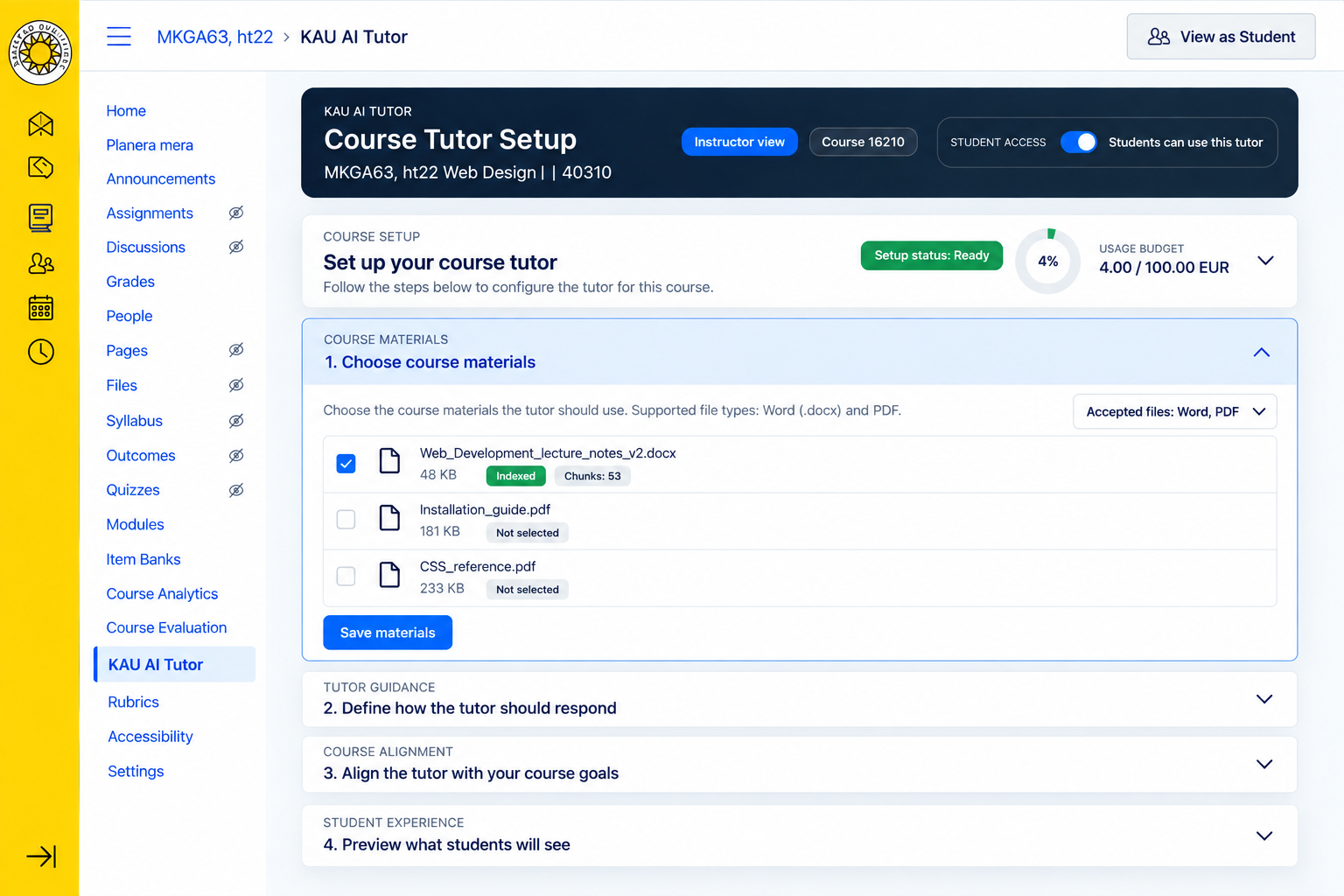
The course defines the knowledge.
Instructors select existing Canvas course files using checkboxes. These chosen resources become the tutor’s knowledge base, keeping its context tied to the course.
Behind the interface
One application across existing platforms.
Karlstad University already had Canvas, the KIM WordPress multisite and Berget’s language-model services. I built the application as a custom WordPress plugin on KIM and connected it directly to Canvas using LTI 1.3 and APIs.
Teachers and students work inside Canvas. KIM provides the underlying application platform without requiring them to navigate WordPress or move into a separate learning environment.
KAU AI Tutor / Conceptual system view
- Canvas
Learning environment - LTI 1.3 / APIs
Integration - KAU AI Tutor
Custom WordPress plugin on KIM - RAG
Selected course knowledge - Berget
Language-model service
A conceptual view of the components and their connections.
Retrieval-Augmented Generation (RAG) brings relevant material from the instructor-selected course resources into the context used by the language model to answer a question. This is how the tutor connects a conversation to the course’s own knowledge.
02 / Tutor guidance
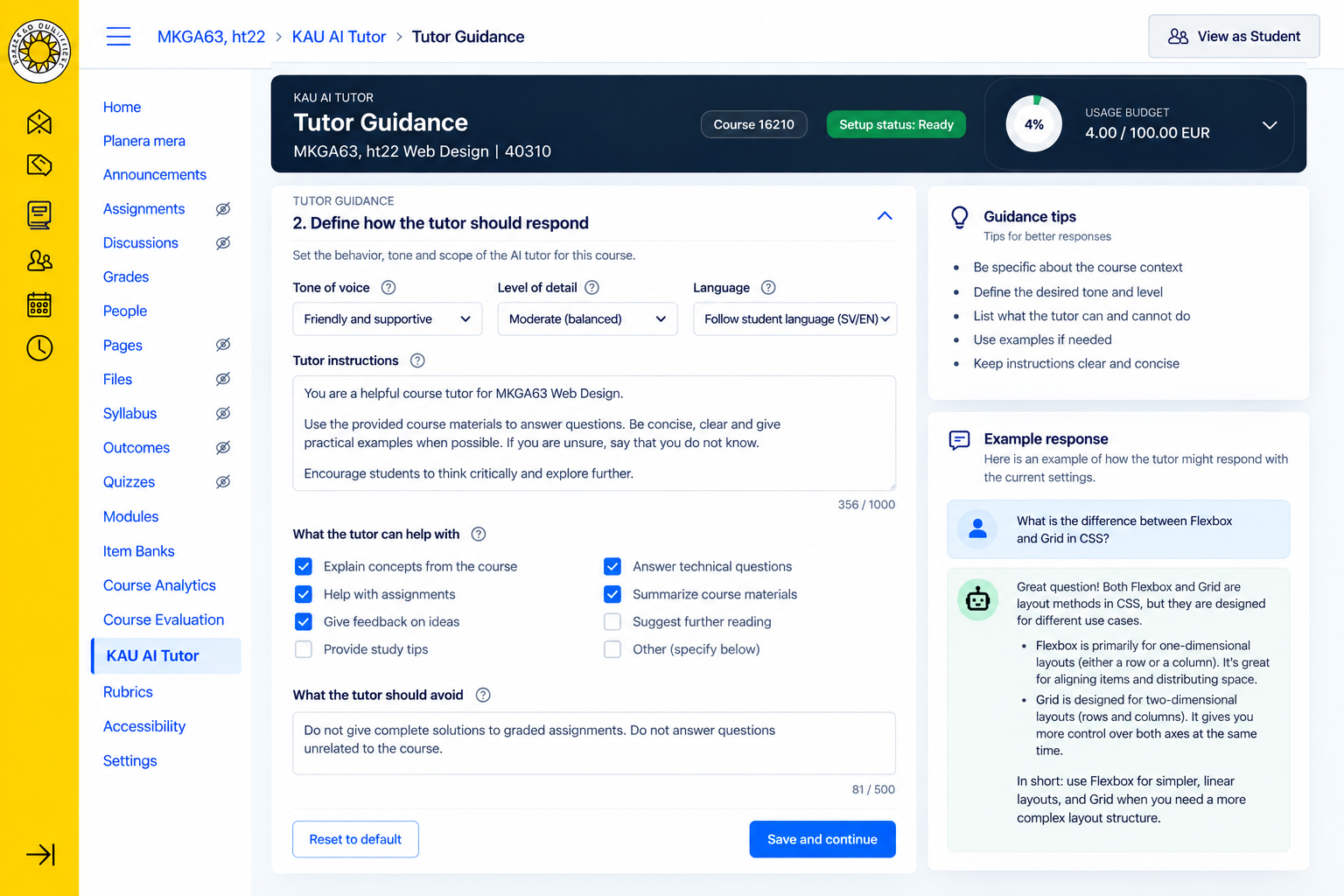
Define how the tutor should help.
Instructors configure the tutor’s system prompt and can use prepared prompt suggestions. They set the intended behaviour and scope of the support for their course, then refine the configuration as needed.
Course alignment
Give the tutor a learning direction.
Course goals can be entered as text or provided in a file. They supply additional context for configuring the tutor’s behaviour and aligning its support with what the course is intended to teach.
03 / Instructor preview
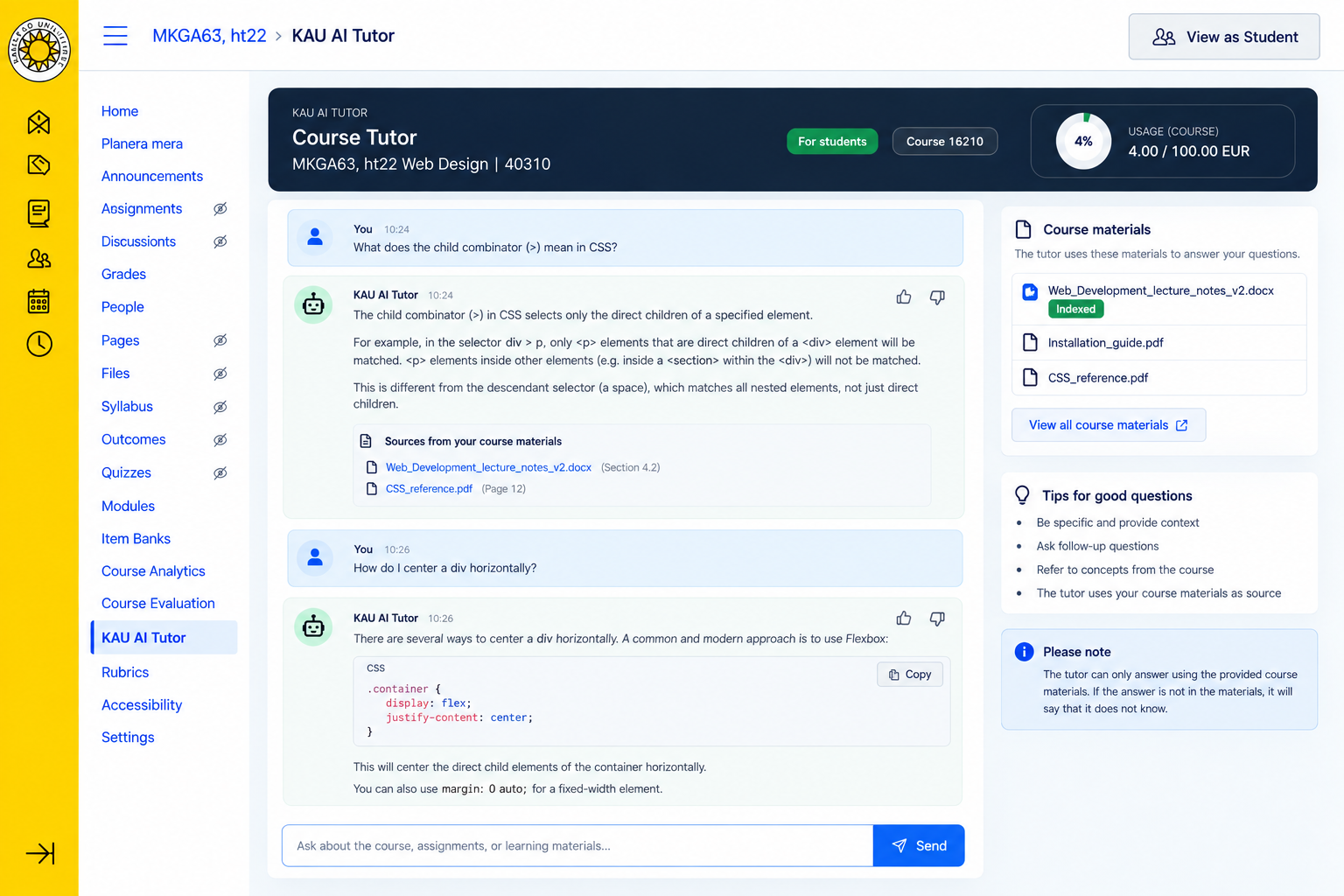
Test the conversation before students use it.
Teachers can try the tutor from a student’s perspective, ask questions and inspect the responses. This gives them a way to test the selected knowledge and guidance together.
They can return to the configuration, refine it and make the tutor available to students when ready.
04 / Student experience
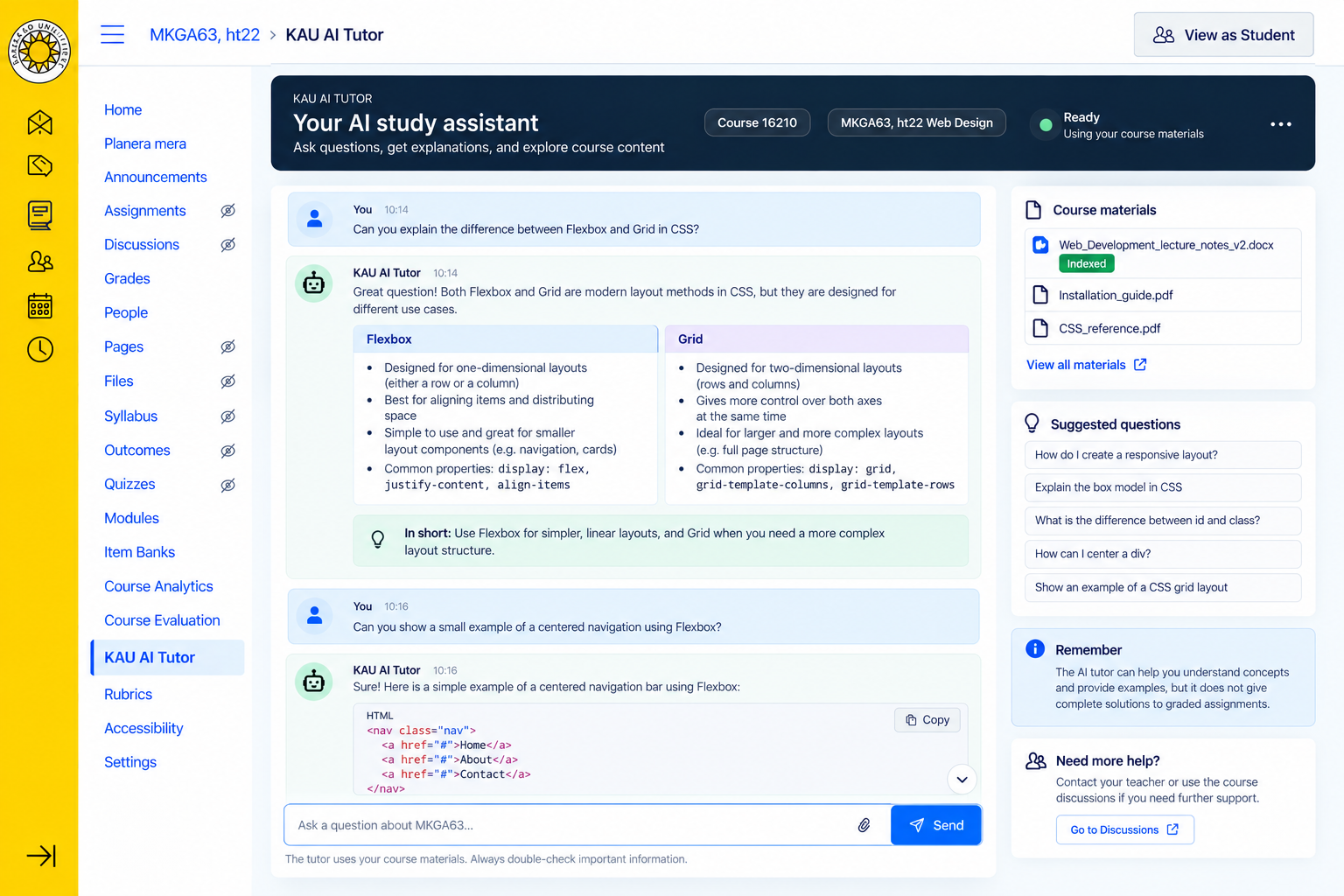
A conversation in the context of the course.
Students can start a new conversation, return to previous conversations and ask questions without leaving Canvas. RAG grounds the answers in the course resources chosen by their teacher.
Access and governance
Automated processing. Human approval.
Access begins with an instructor request, available from within Canvas through a Gravity Forms workflow on KIM. The provisioning process includes automated processing and retains final human/admin approval before the tutor is activated for a course.
- Request
Submitted by the instructor - Automated workflow
Gravity Forms on KIM - Human approval
Final review by an administrator - Activation
Access enabled for the course
05 / Usage, cost & learning analytics
Understand the system in use.
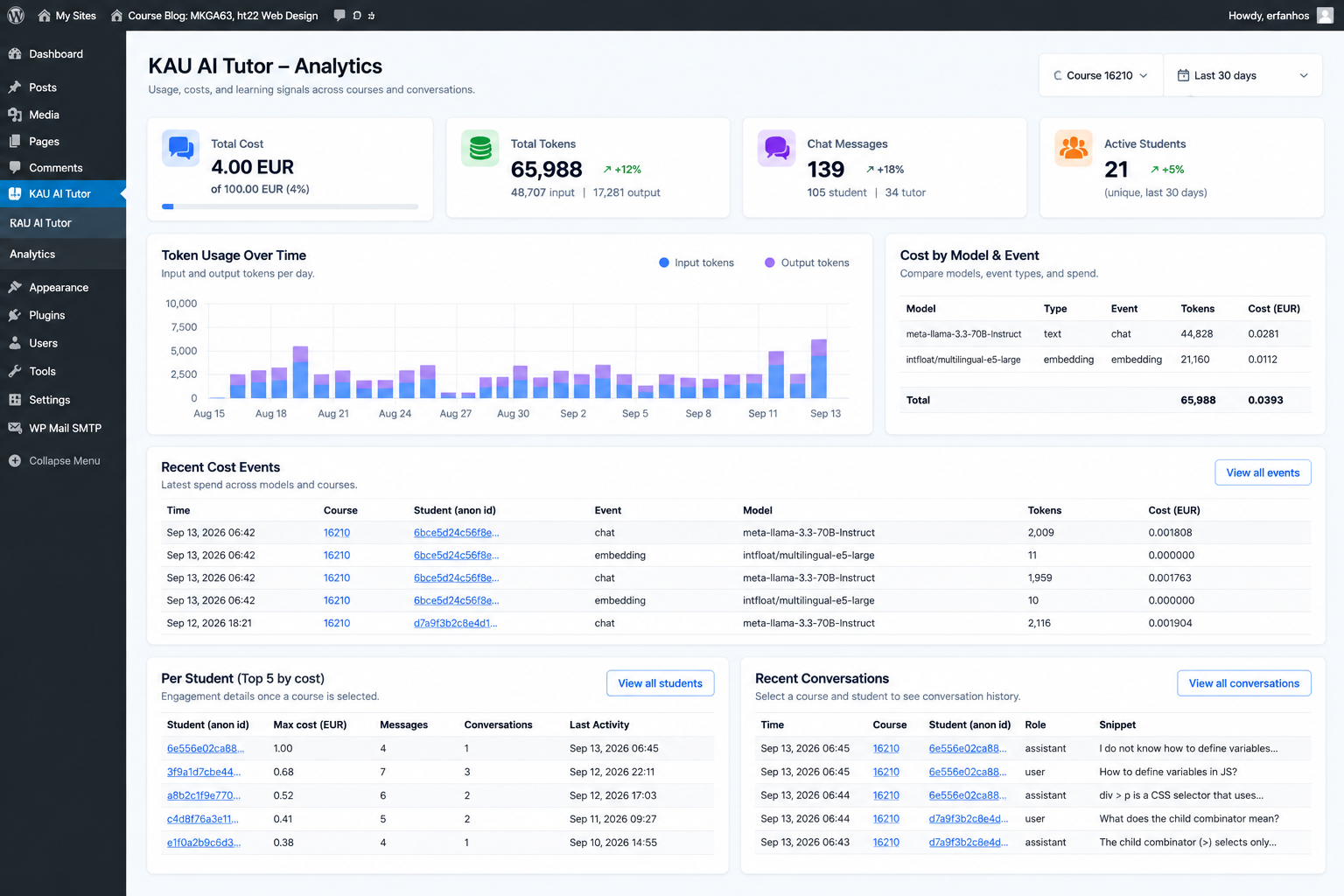
The analytics view brings together usage, token consumption, costs and conversations. It provides an operational view of the tutor alongside the questions people are asking.
Learning insights
What the questions may reveal.
Student conversations are stored anonymously. Questions asked while working with course material may point to difficult concepts, recurring misunderstandings and topics that need more explanation.
This is a potential source of insight for teaching. Activity and spending figures describe use of the system; they do not establish an improvement in learning.
Current status
Live in several courses.
KAU AI Tutor is live and operational at Karlstad University. Instructors can configure and test a course-specific tutor, and students can use it directly inside Canvas. Access is being provided through the request and approval process, rather than enabled automatically for every course.